Exif Date Organizer
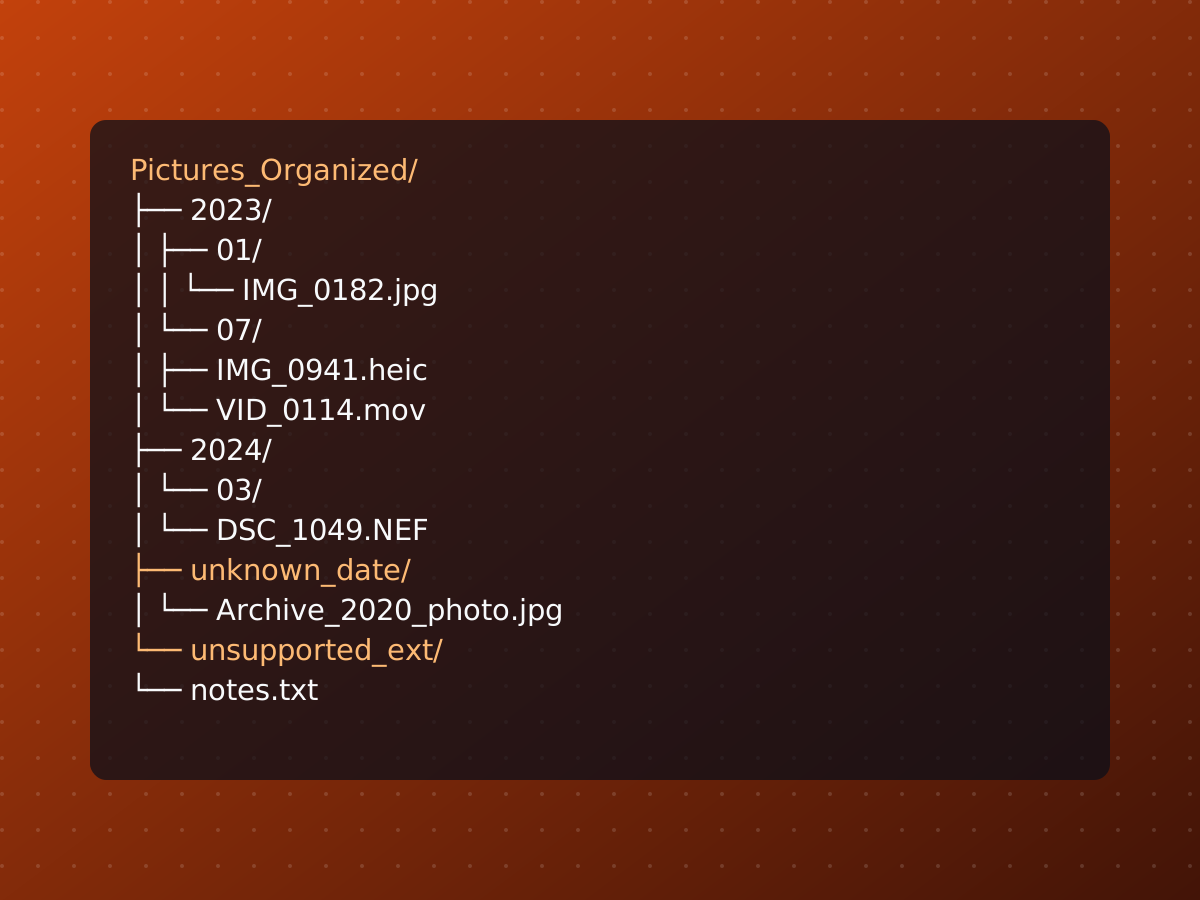
Years of photos and videos end up scattered across old phone backups, camera SD card dumps, and random download folders, with no consistent naming or structure. exif_date_organizer.py is a single-file Python CLI that fixes that: it recursively scans a source folder, figures out the real date each file was taken, and copies it into a clean DEST/YYYY/MM/ tree — leaving the original source untouched.
Where the date comes from
Embedded EXIF is the source of truth when it’s available. The tool shells out to exiftool, batching reads across many files at once for speed, and checks fields in order of trust: DateTimeOriginal, then CreateDate, then ModifyDate.
A lot of real-world files don’t have any of those — old scanned photos, screenshots, files that have been copied around enough times to lose their metadata. For those, it falls back to parsing a date out of the filename or the folder path, trying patterns from most to least specific:
DATE_PATTERNS = [
    # Full dates with separators: YYYY-MM-DD, YYYY_MM_DD, YYYY.MM.DD, YYYY MM DD
    re.compile(r"(?P<year>19\d{2}|20\d{2})[-_\. ](?P<month>0?[1-9]|1[0-2])[-_\. ](?P<day>0?[1-9]|[12][0-9]|3[01])"),
    # Compact full dates: YYYYMMDD
    re.compile(r"(?P<year>19\d{2}|20\d{2})(?P<month>0[1-9]|1[0-2])(?P<day>0[1-9]|[12][0-9]|3[01])"),
    # MM-DD-YYYY / MM.DD.YYYY / MM_DD_YYYY
    re.compile(r"(?P<month>0?[1-9]|1[0-2])[-_\. ](?P<day>0?[1-9]|[12][0-9]|3[01])[-_\. ](?P<year>19\d{2}|20\d{2})"),
    # YYYY-MM / YYYY_MM / YYYY.MM / YYYY MM
    re.compile(r"(?P<year>19\d{2}|20\d{2})[-_\. ](?P<month>0?[1-9]|1[0-2])"),
]
If a file has both an embedded date and a derived one and they land in different year/month buckets, the embedded one wins — the filename is just a fallback, not a second vote.
It writes dates back, too
This isn’t just a read — the tool also stamps the destination copy’s EXIF with whatever date it decided on. If a file has no embedded date at all, or its DateTimeOriginal/CreateDate/ModifyDate are only partially set, or a derived date from the filename/folder overrides a mismatched embedded one, exiftool -overwrite_original writes all three fields on the copy once it lands in DEST/YYYY/MM/. So an old scanned photo named 1998-06-14 scan.jpg with zero metadata doesn’t just get filed into the right folder — it comes out the other end with real embedded EXIF dates too. The source file is never touched; only the copy in the destination tree gets rewritten.
Collisions and duplicates
Since files get copied (never moved) and re-runs are expected — you’ll point it at the same messy source folder more than once as you find new drives to pull from — the destination path can already have something sitting there. Before overwriting anything, it compares the two files by MD5 hash:
- Identical content → skip, logged as
skipped. - Different content, same name → the incoming file gets
_1,_2, etc. appended until it lands somewhere new.
Anything ExifTool can’t read and anything with no usable date at all still gets accounted for rather than silently dropped: unreadable files go to unsupported_ext/ (only if you pass --copy-unsupported; otherwise they’re just logged and skipped), and supported files with no derivable date land in unknown_date/, prefixed with their original relative path so you can still tell where they came from — Archive/2020/photo.jpg becomes unknown_date/Archive_2020_photo.jpg.
Usage
# see what it would do first — nothing is copied
python3 exif_date_organizer.py --source ~/Pictures --dest ~/Pictures_Organized --dry-run --verbose

# the real run, with a log to review afterward
python3 exif_date_organizer.py --source ~/Pictures --dest ~/Pictures_Organized --log ~/Pictures_Organized/exif_date_organizer.log

# also sweep unrecognized extensions into their own folder instead of skipping them
python3 exif_date_organizer.py --source ~/Pictures --dest ~/Pictures_Organized --copy-unsupported
Every run — dry or real — writes a tab-separated log with the source path, the raw EXIF values, the derived timestamp, the destination, and a status (copied, dry-run, skipped, unsupported, or error), so a run through tens of thousands of files is still auditable afterward instead of a black box.
The only real dependency is exiftool itself being installed and on PATH — everything else is Python standard library (argparse, pathlib, subprocess, shutil, hashlib).
Built mostly by describing what I wanted to Claude Code and Copilot and iterating on the output rather than writing it by hand — vibe coded, as the README puts it.
Source: github.com/cleverswine/exif-tool