spotui
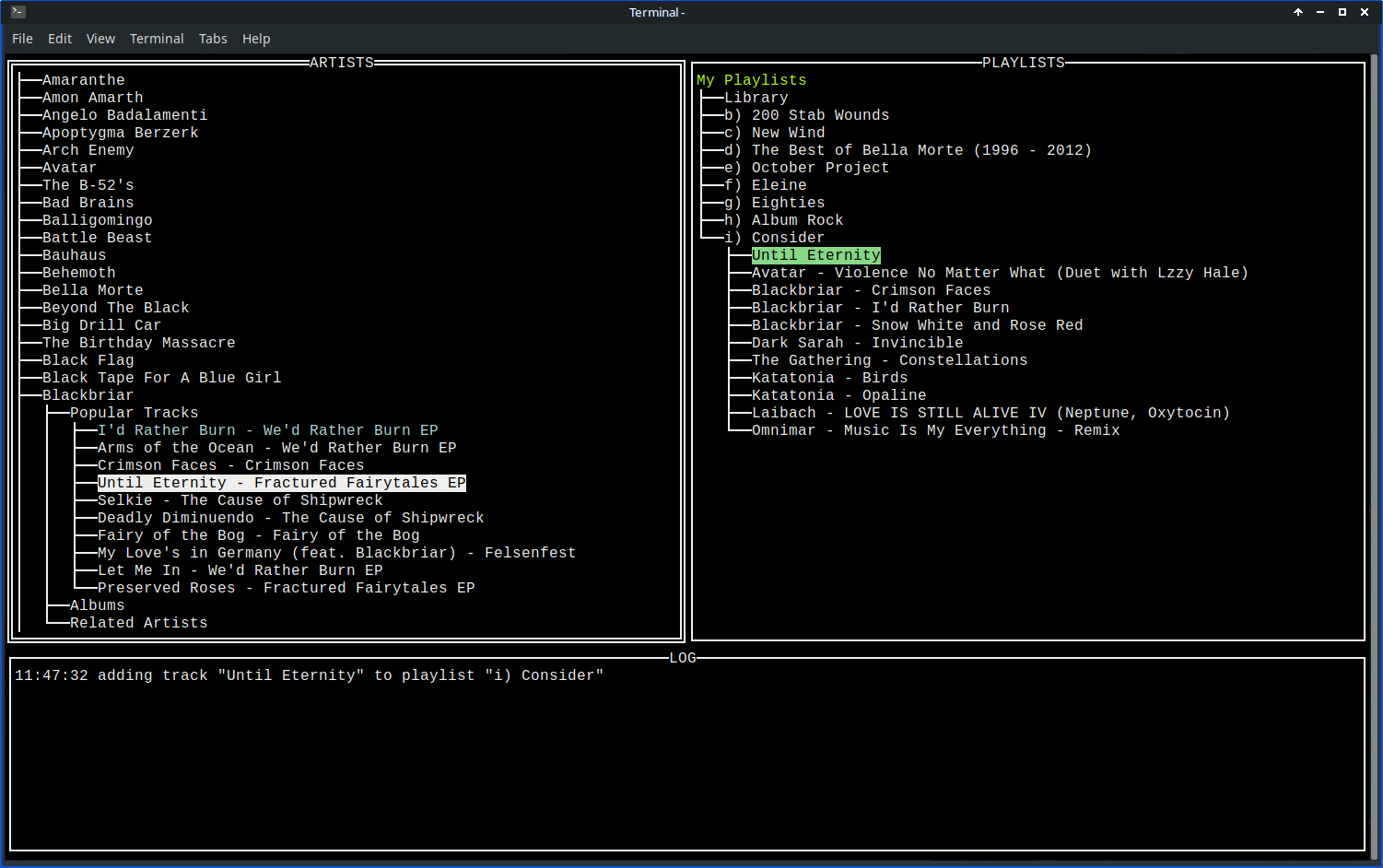
spotui is a terminal-based Spotify library browser, built mostly as an excuse to learn Go’s TUI ecosystem — tview and tcell — rather than to be a polished tool. It lays your followed artists and your playlists out as two trees side by side, with a log pane underneath, and lets you build a playlist by browsing an artist’s catalog and tapping a single key.
Two lazy trees
Nothing loads until you ask for it. Pressing the right arrow on a node calls its ExpandFunc — a closure attached to that Node — which hits the Spotify API and appends the results as children; pressing right again on an already-expanded node just re-shows what’s there instead of re-fetching. Left collapses the current node, and Esc collapses every top-level node at once so a deep dive into one artist doesn’t leave the rest of the tree sprawling.
Drilling into an artist walks Popular Tracks / Albums / Related Artists, and Related Artists loops back to the same three categories — so you can wander from one artist to a related one to their related artists indefinitely, all without leaving the tree. Anything already in your saved tracks lights up light blue as you browse, via a linear scan against the library pulled down once at startup.
The artist tree also has a crude jump-search: type a capital letter while a top-level node is selected and it jumps to the first artist whose name starts with it, which matters once you’re following more than a couple dozen.
One keystroke to build a playlist
This is the actual point of the app. Each of your playlists gets a single-letter/digit index (a through z, then 0 through 9) shown right in its tree label, with a reserved for your saved-tracks library. Select any track in the ARTISTS tree and press that key, and it’s added to that playlist — no menus, no confirmation:
func trackKeyPress(n *Node, k string) {
	playlistChan <- &AddTrackToPlaylist{Track: n, PlaylistIndex: k}
}
A goroutine reads that channel, calls the Spotify API to do the add, then expands the target playlist node in place and inserts the new track at the top, highlighted light green — the UI updates without re-fetching the whole playlist. The PLAYLISTS tree has the inverse: press x on a track there and it’s removed from that playlist (or from your library, under the Library node) and turns red instead of disappearing, so you get a visual confirmation before it’s gone from view.
Auth
Spotify’s OAuth flow needs a real redirect URI, so SpotifyClientBuilder spins up a local HTTP server on :8080 and prints a login URL to visit. Once you approve it in the browser, the callback handler grabs the token off a channel and unblocks startup; SaveToken then writes it to token.json so later runs skip the browser step entirely, as long as SPOTIFY_ID and SPOTIFY_SECRET are set:
#!/usr/bin/env bash
export SPOTIFY_ID=""
export SPOTIFY_SECRET=""
go run *.go
That’s run.tpl — copy it, fill in credentials from a Spotify developer app, and run it.
It’s still rough — the one open TODO is escaping [] in track and album labels, since tview treats square brackets as color/region tags and titles that contain them currently render wrong. But for skimming a big library and dropping a good track into the right playlist without touching a mouse, it does the job.
Source: github.com/cleverswine/spotui